
Settings Overview
The Settings page is the command center for your AI assistant.
From here, you can control how your bot behaves, how it looks, when it operates, and manage your account details.
1. How to Access
There are two ways to access the settings hub:
1. Sidebar: Click the "Settings" link in the left-hand menu.
2. Direct: Navigate to /dashboard/settings in your browser.
2. Configuration Areas
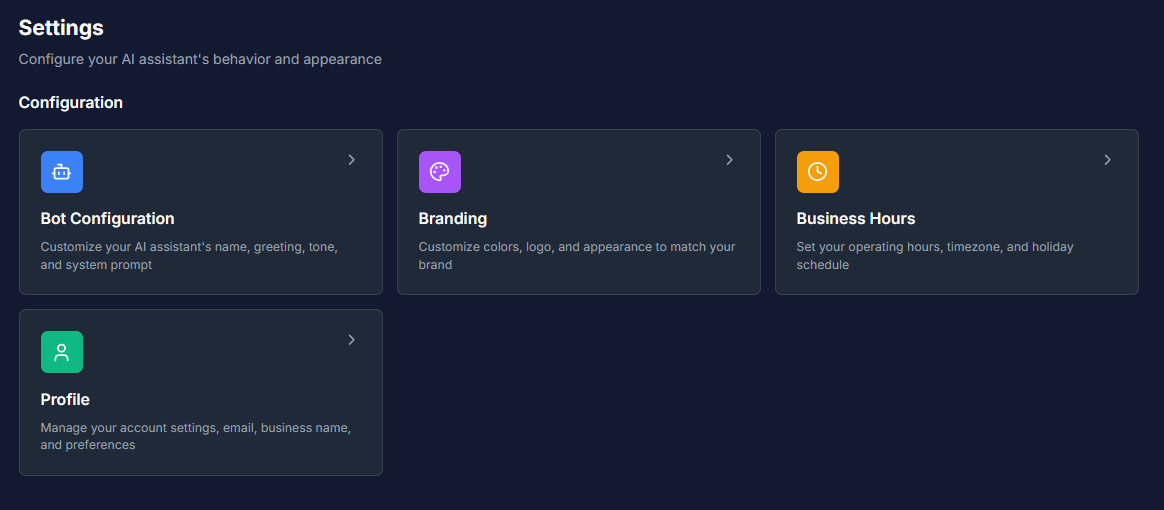
The Settings dashboard is divided into four main cards, each representing a specific area of control.
🤖 Bot Configuration
• What it does: Customize your AI's personality. Set the bot's name, write a custom greeting message, choose a tone (e.g., Professional, Friendly), and use the System Prompt for advanced behavioral instructions.
• Availability: Basic & Pro plans.
🎨 Branding
• What it does: Make the chat widget match your website. Upload your company logo, change the header color, and customize message bubble colors.
• Availability: Basic & Pro plans.
🕒 Business Hours
• What it does: Define when you are "Open" or "Closed." Set your specific timezone, create a weekly schedule, and add holiday closures.
• Availability: All Plans (including Freemium).
👤 Profile
• What it does: Manage your personal account details. Update your business name, change your email address, and manage your password.
• Availability: All Plans.
3. Plan-Based Access & Locks
Some settings are exclusive to paid subscriptions. The dashboard clearly indicates which features are available to you.
| Setting | Freemium Plan | Basic/Pro Plans |
|---|---|---|
| Bot Configuration | ❌ Locked (View Only) | ✅ Full Access |
| Branding | ❌ Locked (View Only) | ✅ Full Access |
| Business Hours | ✅ Full Access | ✅ Full Access |
| Profile | ✅ Full Access | ✅ Full Access |
Note for Freemium Users: You can click on locked cards to view the settings, but you will not be able to edit them. An "Upgrade Plan" prompt will appear if you try to save changes.
Common Questions
Q: Why can't I click on "Bot Configuration"? A: If the card appears grayed out or shows a lock icon, you are likely on the Freemium plan. You must upgrade to Basic or Pro to customize the bot's personality and branding.
Q: Will changing my "Profile" settings affect the bot? A: No. Profile settings (like your email or password) are for your account access only. To change the bot's public name, use Bot Configuration.
Q: Where do I find the chat widget code? A: The code to embed the chat on your website is located under Integrations, not the main Settings page. Click "Integrations" in the sidebar to find it.