
The Overview
The Overview serves as the homepage for your Stayfront dashboard.
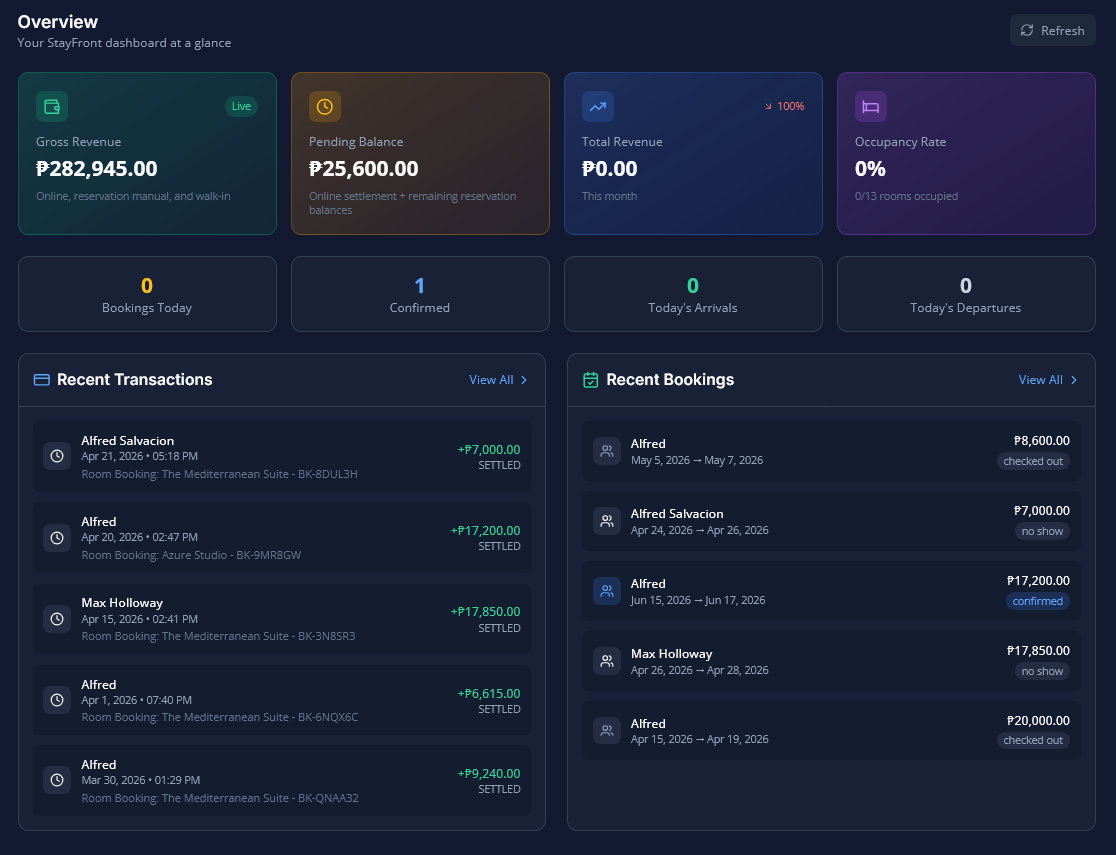
The Overview tab serves as the homepage for your Stayfront dashboard. It provides a high-level snapshot of your property's performance by displaying real-time Key Performance Indicators (KPIs) and recent platform activity.
Here is a breakdown of everything you will find on this tab:
1. Revenue & Occupancy Cards
At the top of the Overview tab, you will see four main cards that track your property's financial health and room usage:
- Gross Revenue: This shows your total available balance, which includes online payments that have already settled and manual payments you have already collected.
- Pending Balance: This shows the amount of money currently in transit. It includes pending online payment settlements as well as remaining balances due on reservation-only bookings.
- Total Revenue This Month: This tracks your gross revenue for the current month. It also displays a percentage change to show how you are performing compared to the previous month.
- Occupancy Rate: This displays the percentage of your available room units that are currently occupied. Beneath the percentage, you will also see the exact fraction (e.g., "5/10 rooms occupied").
2. Booking Stat Chips
Directly beneath the revenue cards are four quick-glance chips that summarize your daily operations:
- Bookings Today (Amber): The number of brand new bookings created today.
- Confirmed (Blue): The total number of currently confirmed bookings in your system.
- Today's Arrivals (Green): The number of guests scheduled to check in today.
- Today's Departures (Slate): The number of guests scheduled to check out today.
3. Recent Activity
To help you keep track of real-time movements, the dashboard displays two lists side by side, both sorted with the most recent actions first:
- Last 5 Payment Transactions: Displays the transaction amount, status, and date.
- Last 5 Bookings: Displays the guest's name, confirmation code, booking status, and check-in date.
4. Status Color Guide
Throughout the Overview tab (and the rest of the Stayfront platform), statuses are color-coded so you can quickly identify the state of a booking or payment:
- Amber: Tentative / Pending bookings, or PENDING payments.
- Blue: Confirmed bookings.
- Emerald/Green: Checked-in guests, or PAID / SETTLED payments.
- Slate/Gray: Checked-out guests, or Expired bookings.
- Red: Cancelled bookings, No-shows, or EXPIRED / FAILED payments.