
Usage & Resources
The Usage & Resources page is your utility meter.
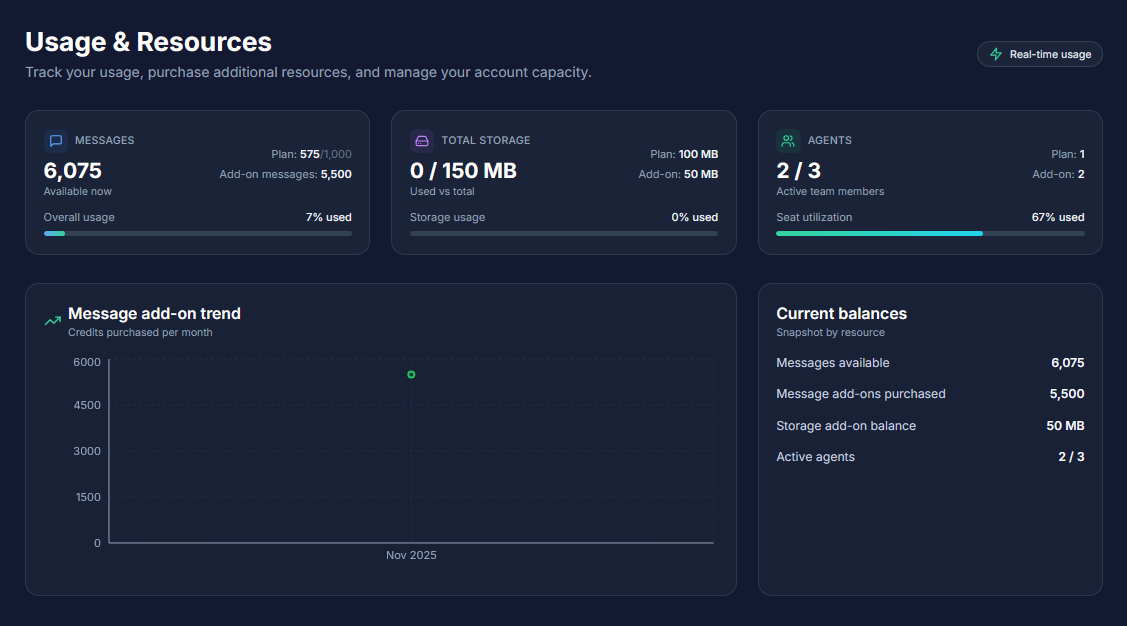
It shows exactly how much "fuel" (messages), storage space, and team capacity your business has used. This is also the marketplace where you can buy "Add-on" packages if you run out of resources before your monthly renewal.
How to Access: Click "Usage & Resources" in the left sidebar menu.
Plan Requirement: This feature is exclusive to Basic and Pro plans.
• Freemium Users: You will see a summary gate explaining the benefits of tracking usage and purchasing add-ons.

The dashboard displays three main usage cards.
💬 Messages (Chat Quota)
This tracks the AI's conversation capacity.
• Plan Quota: The monthly allowance included in your subscription (e.g., 1,000 for Basic, 5,000 for Pro).
• Add-on Remaining: Extra messages you purchased separately.
• Reset Rule: Your Plan Quota resets every month. Your Add-on Messages do not expire and roll over indefinitely until used.
📂 Storage (Knowledge Base)
This tracks the space used by your uploaded PDFs and documents.
• Visual: A progress bar shows your consumption (e.g., "25/100 MB Used").
• Limits: Basic includes 100 MB; Pro includes 500 MB.
👥 Agent Seats (Team Capacity)
This tracks how many human agents are currently active on your team.
• Display: Shows "Active Agents" vs. "Total Seats".
• Included: Basic includes 1 Seat; Pro includes 3 Seats.
3. Purchasing Add-Ons
If you hit your limit, you don't need to upgrade your entire plan. You can buy specific resources à la carte.
Buy More Messages (One-Time Purchase)
These are "top-up" packs. They are perfect for seasonal spikes (like Christmas sales).
• Starter: 500 messages for ₱1,250
• Standard: 1,000 messages for ₱2,500
• Premium: 2,500 messages for ₱5,000
• Note: These messages never expire.
Buy More Storage (Monthly Subscription)
Need to train the AI on more manuals? Expand your brain capacity.
• Small: +50 MB for ₱400/mo
• Medium: +100 MB for ₱800/mo
Buy Agent Seats (Monthly Subscription)
Need to hire more support staff?
• Price:₱500 per seat/month.
• Activation: Seats are available immediately after payment.
Supported Payment Methods: You can pay securely using Direct Debit (BPI, RCBC, UPB, Chinabank) or E-wallets including GCash, Maya, GrabPay, and ShopeePay.
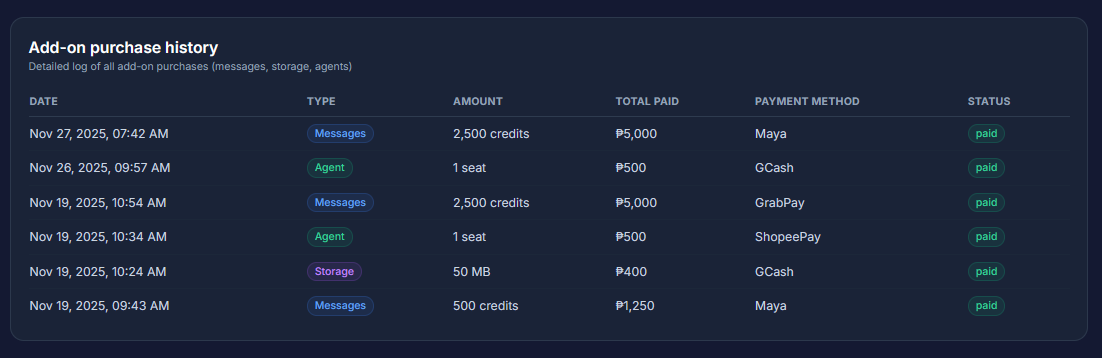
Viewing Purchase History: At the bottom of the page, the Purchase History table lists all your previous transactions, including the date, package type, and amount paid.
Usage Trends: The Message Add-Ons Trend chart (Area chart) visualizes your purchasing habits over time, helping you decide if you should upgrade to a higher plan instead of constantly buying add-ons.
FAQ & Troubleshooting
Q: If I buy messages, do they disappear next month? A: No. "Add-on" messages never expire. Only your base "Plan" messages reset at the end of the month.
Q: What happens if I run out of messages? A: Your AI will stop responding to new customer inquiries until the quota resets or you purchase an add-on.
Q: How fast is the activation? A: Immediate. As soon as the payment is confirmed (usually seconds), your new messages, storage, or seats are ready to use.